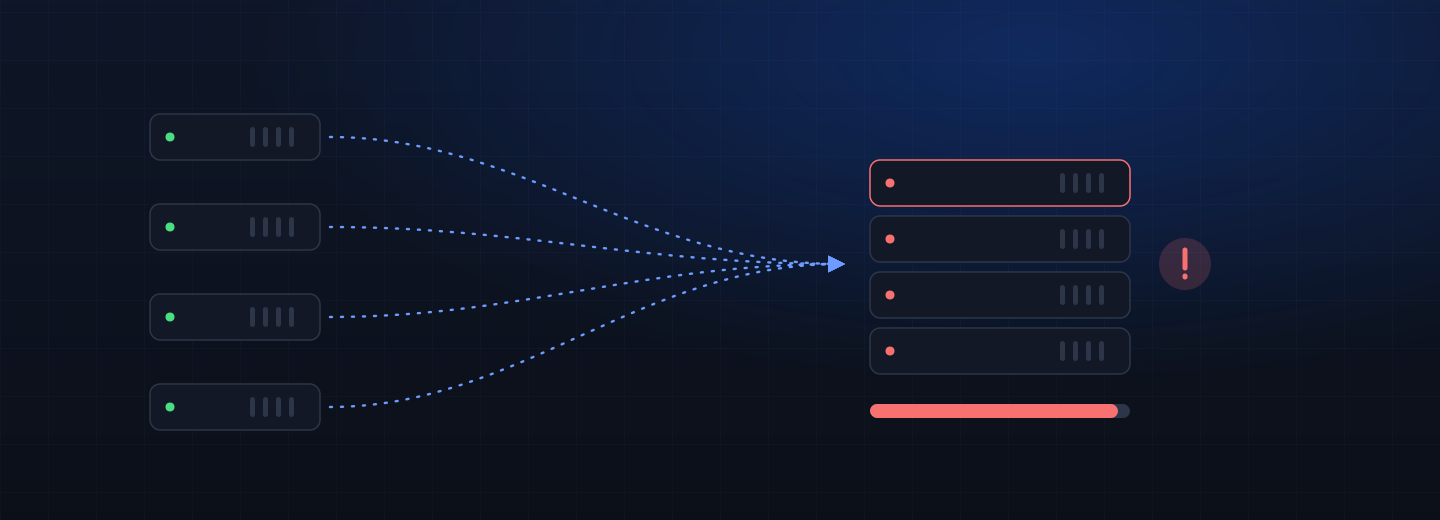

There is a question every incremental backup asks, every night, of every file in every account: did you change?
Twelve million times, on the server we measured. And the answer, almost always, is no.
We had already taken that work off the storage: Salvo checks on the server itself what changed and sends the storage only what is new (we told that story in Why your backup server is always busy). But the question was still there, on the server: to know what changed, the backup still had to walk through every folder.
Not anymore. Salvo notes throughout the day which folders changed and, when the backup runs, goes straight to them. Everything else it reuses from the previous backup.
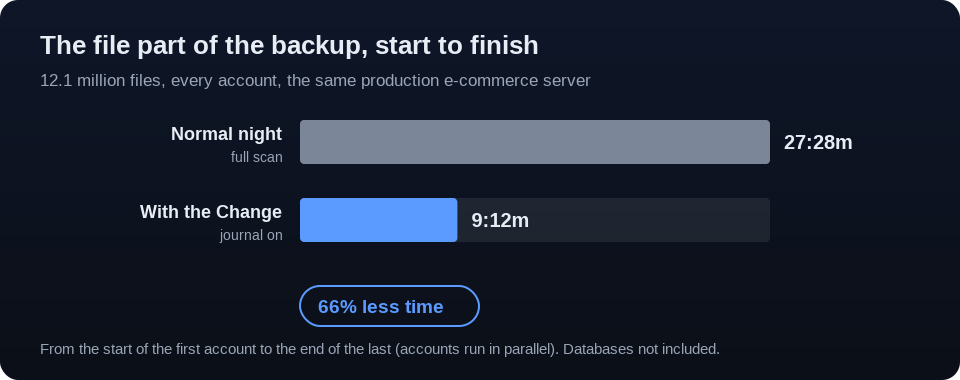
Short answer: a regular incremental backup, on cPanel and DirectAdmin, walks every folder of every account every night just to find out what changed, and that is where most of the time goes on a large server. With the Change journal, Salvo already knows which folders changed before it starts, walks only those and reuses the rest. On an e-commerce server in production, the 12.1 million files part dropped from 27:28m to 9:12m on the first night with the Change journal on: 66% less time, without missing a single change in the measurement.
Why incremental backups take so long even when almost nothing changed
"Incremental" promises to copy only what changed. And it does. The problem is finding out what changed: to do that, the backup opens every folder and looks at every file, compares date and size with the previous backup, and moves on to the next one. On a server with millions of files, that walk alone takes most of the night, even if in the end only a few hundred files changed.
It's like counting the stock of an entire supermarket, shelf by shelf, to find out that someone bought three bags of coffee.
What the Change journal does
Salvo now follows the server during the day and notes which folders of each account changed. When the backup runs:
- it walks only the noted folders;
- it reuses from the previous backup everything that did not change;
- the backup point it produces is complete, same as always: it restores on its own, the whole account (why every point in Salvo is complete).
It works the same on cPanel and DirectAdmin, and it ships turned off: the admin turns it on whenever they want, server by server.
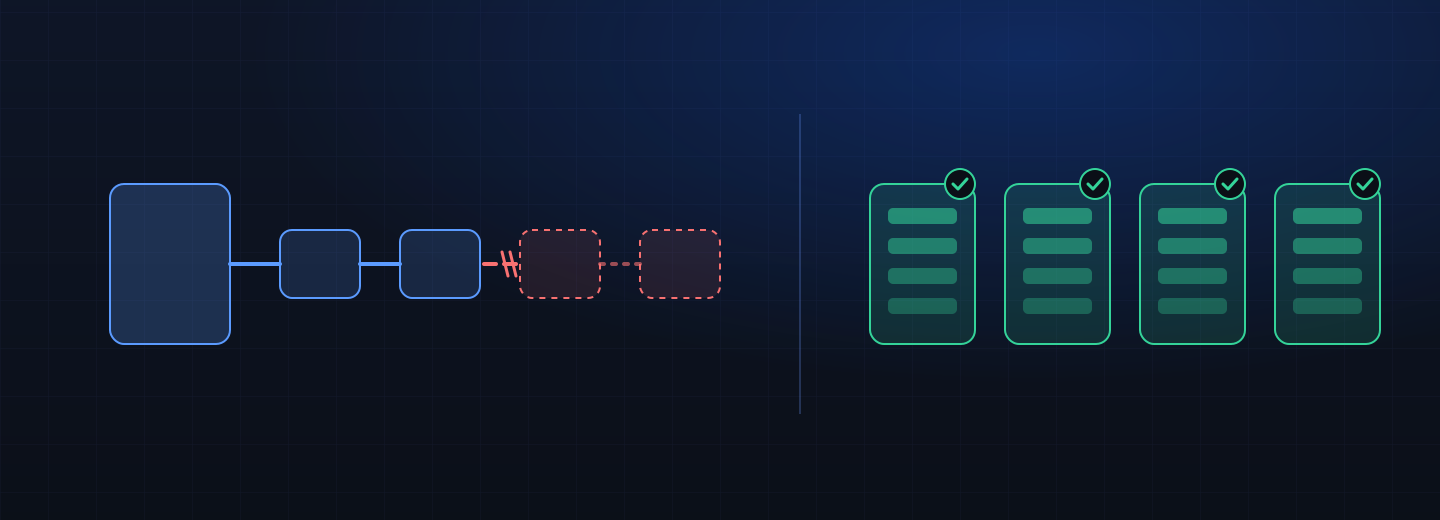
"What if it misses a change?"
That was the first question we asked ourselves. A faster backup that forgets a file is worse than a slow backup. That's why the Change journal was born suspicious of itself:
- Measure only. Before turning it on, it can run in measurement mode: the backup does the usual full scan and only compares it with what the Change journal would have done. The result goes into the log of each run. The documentation's advice is to turn it on only when the summary shows zero missed folders.
- A full pass from time to time. Even when it's on, on the first night and every 3 nights per account Salvo does the full scan. After 10 nights in a row without any difference, it goes to every 7; any difference brings it back to 3.
- A check every night. For each account, it checks a sample of the reused folders against the disk and looks for newly created files that were left out. Found a difference? The account gets a warning and does the full scan on the next copy.
- When in doubt, back to full. If the Change journal restarted, lost events or didn't respond, that night is full. On its own, without anyone having to notice.
Being suspicious is not decoration. On the first night with the Change journal on, the check caught a real case: 19 files in one account had kept the previous version. It was a WordPress plugin update. WordPress builds the new version in a temporary folder and puts it in place of the old one by renaming it. The Change journal saw the change in the folder above, but the plugin folder had the same name as before and was reused.
The night's sample found it, the account got a warning and went to the full scan on the next copy, exactly as described above. The earlier backups were intact, nothing was lost. And we fixed it the same day: now, a folder that is created or moved counts as changed in full, with everything inside it. That's what the check is for.
All of this shows up in the run, in the log and in the Audit. The details are in the Change journal documentation.
The proof: two weeks side by side
We didn't turn the Change journal on because the idea was good. We turned it on because we measured.
For two weeks, on an e-commerce server in production, Salvo ran the Change journal in measurement mode: every night, the usual full scan did the backup, and the Change journal said, alongside, what it would have examined. At the end of each night, the two lists were compared.
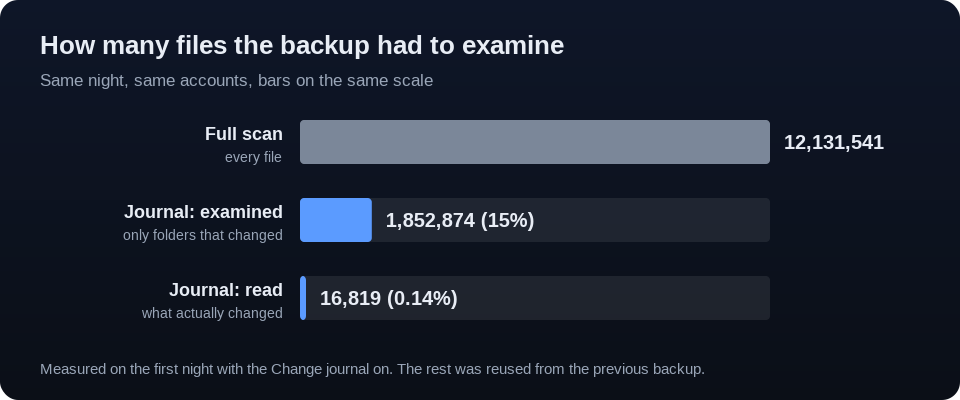
In the last measurement, the full scan examined 12.1 million items. The Change journal would have examined 1.79 million: about 15%. And in two weeks, not a single change the full scan saw was left out of the Change journal.
On Nov 25, we turned it on. The first night was a full scan of every account, on purpose, to serve as the baseline. The next night, the first fast one, every account went through the Change journal. The 12.1 million files part, from the start of the first account to the end of the last, took 9:12m. On a normal night before, with the full scan, the same part took 27:28m: 66% less time. The Change journal sent 1.85 million files to be examined, and only 16,819 had to actually be read; the rest was reused. The largest account on the server, with 5.2 million files on its own, took about 50 seconds.
Databases have their own path, which doesn't depend on the Change journal: we explained how Salvo avoids rereading tables that didn't change in Turning on MySQL performance_schema makes database backups faster.
One server, one store: it isn't a market average, and we won't treat it as one. But it is exactly the kind of server that suffers most from the scan: lots of files, almost all of them idle, a few changing all day long.
What's next: from "someone touched this drawer" to "it was this sheet of paper"
Today the Change journal knows which drawer someone touched. The next step is knowing which sheet of paper. And we have already started measuring how much that is worth.
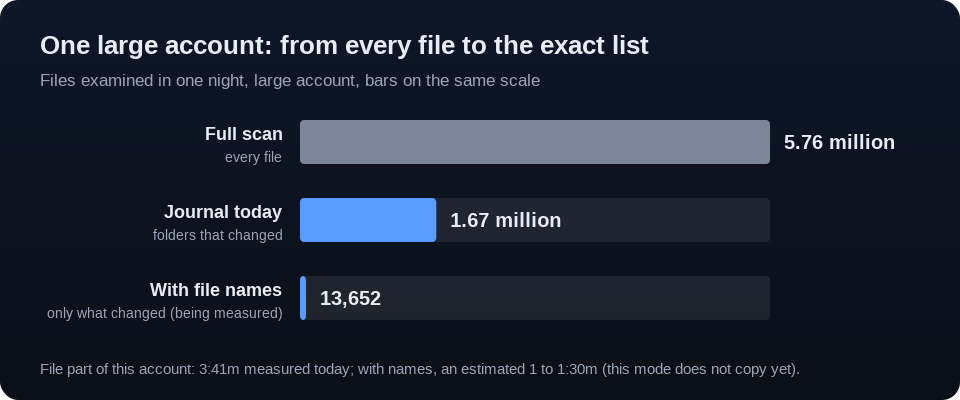
We took the largest account on the same server, on the same first fast night. To find the 13,652 files that changed:
- the full scan would examine 5.76 million files;
- today's Change journal, which notes folders, examined 1.67 million;
- with file names, the backup would go straight to the 13,652.
From millions to tens of thousands. On the same account, the files part took 3:41m that night; with file names, our estimate is 1 to 1:30m. It's an estimate, not a backup running: we measured on the server itself, read-only, how much it costs to examine each file (that's what goes away) and how long it takes to read only what changed.
The Change journal is already recording the names, but it doesn't copy by them yet. It will go into the copy the same way the first version did: after nights of measurement without a single gap and a test with every kind of file operation on a real server (write, append, rename over, delete and recreate, link, permission, date). Each one has to show up in the list, or mark the whole folder. When it passes, we'll come back here with the measured time.
How to turn on the Change journal
- Install the Change journal service (from the screen or with
salvo journal-install). - Leave it on Measure only (shadow) for a few nights and check the summary in the run log.
- When the summary shows zero missed folders, switch to On in Settings › Performance › Change journal.
The mode change goes to the Audit, and updating Salvo doesn't interrupt the Change journal.
- A regular incremental backup spends most of its time finding out what changed, folder by folder, even when almost nothing changed.
- With the Change journal, Salvo notes during the day which folders changed and, at backup time, walks only those; the point is still complete.
- On the e-commerce server in production we measured for two weeks, the Change journal would examine about 15% of what the full scan examines, with zero missed changes.
- It checks itself: measurement mode before turning it on, periodic full scan, a check every night and back to full when in doubt.
- It ships turned off; the admin turns it on per server, on cPanel and DirectAdmin.
Frequently asked questions
Why does cPanel incremental backup take so long?
Because, to know what changed, it walks every folder and looks at every file, every night. On a server with millions of files, that walk takes longer than copying what changed.
Can DirectAdmin incremental backup get faster too?
Yes. The Change journal works the same on cPanel and DirectAdmin.
Does the fast backup restore the whole account?
Yes. Every point is still complete and restores on its own, like any other Salvo point.
What if the Change journal misses a change?
Salvo checks a sample against the disk every night, does the full scan periodically and goes back to full on its own at any doubt. A difference found becomes a warning and a full scan on the next copy.
Sources: Change journal documentation Lab 15
Next stop: with a shorter backup, what weighs is space. See how much each account takes up: The storage filled up. Which account was it?