The customer asks for the whole account in one file. How long does each tool take to deliver it, how much does that weigh on the server and on the storage, and what comes inside the file?
On the Salvo screen
You keep the keys and the wheel: the file is cPanel's own package
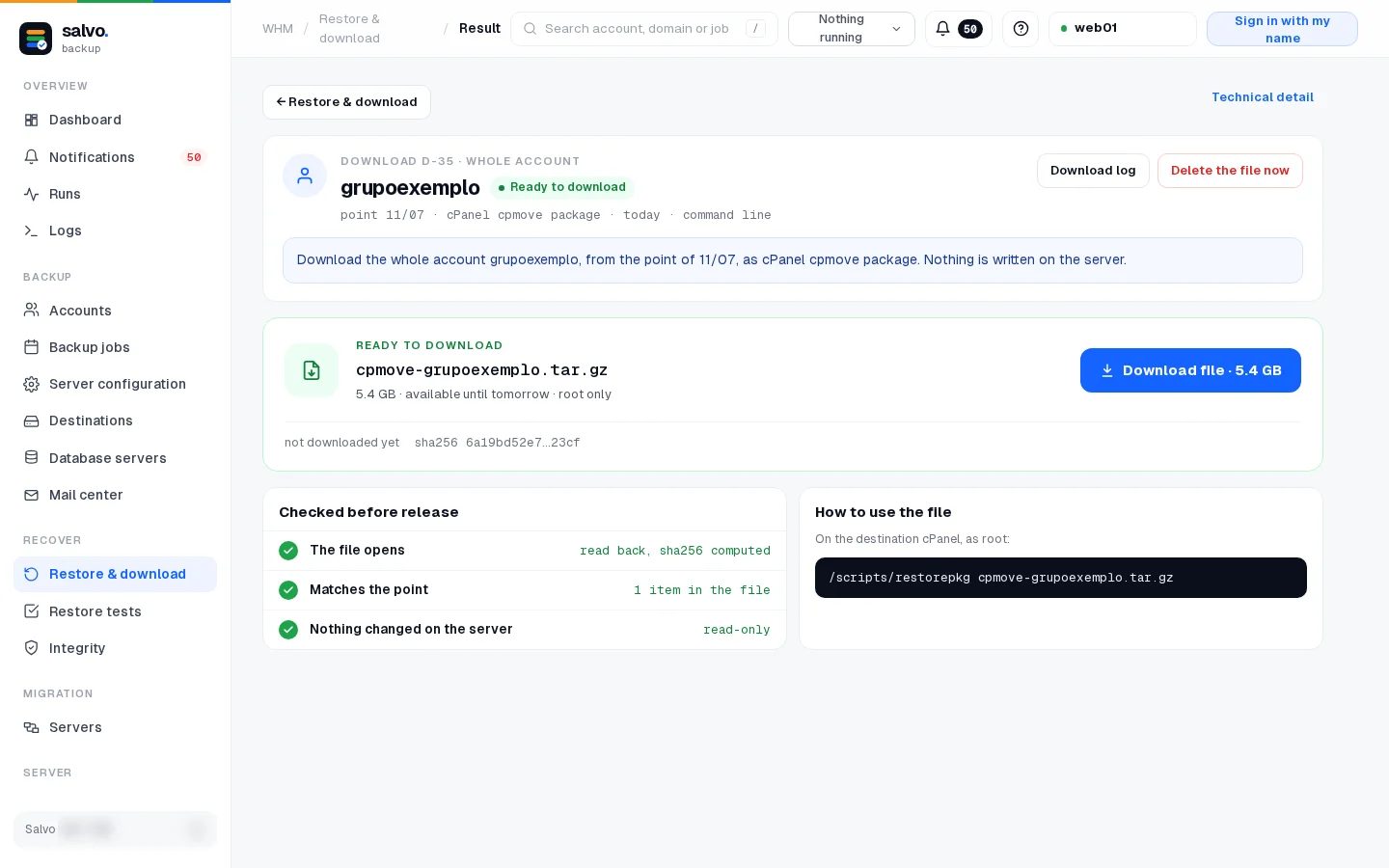
We worked hard to build a file the admin can take to any server. From the backup, Salvo builds the package in the same format and with the same structure as the one cPanel itself generates (cpmove-<account>.tar.gz); on DirectAdmin, DirectAdmin's own package. The format belongs to the panel; we build it, with a process designed to be fast, robust and safe from start to finish: the content is checked before it goes into the package, the final file gets its checksum and sits in a folder only root can read. And before publishing any number, we restore the package with the panel's own tool, on cPanel and on DirectAdmin, and check it file by file, row by row in the databases and message by message.
That is what this lab shows, with no makeup: we measured the time, the weight on the server and on the storage, opened the file and restored it with the panel's tool.
What we measured in this lab, on a cPanel server in production, with both tools reading the same storage.Why it matters to whoever runs the server
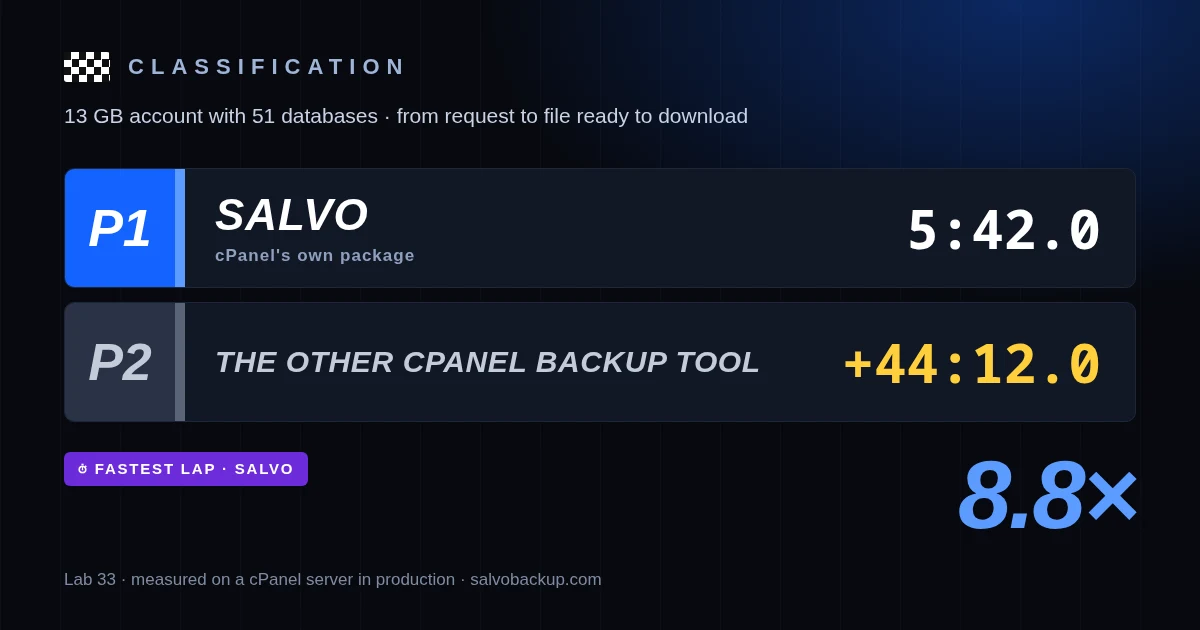
- When the customer asks for "a backup of my account", they are waiting, and every minute is an open ticket. Delivering the 13 GB account in 6 minutes instead of 50 changes the support.See:Lab 32
- What comes inside decides what you can do with the file. The panel's own package restores on any server, without depending on Salvo (see the box above).See:Lab 29
- Speed without a guarantee is no use. Before measuring the new process, the package it builds was restored with the panel's own tool, on cPanel and on DirectAdmin, and it came back whole.See:Lab 28Lab 31
Load and file size are where JetBackup wins: Salvo compresses on several cores to finish sooner (load 13.7 against 5), and block compression makes a file 7% bigger. The admin picks the balance in Settings › Restore.
On the 5 GB account, JetBackup makes fewer calls to the storage, but bigger ones over a single connection; Salvo makes more, smaller calls in parallel, and still reads less.
On the 13 GB account, Salvo is the first round: in the second, another job was using the same storage disk at the same time, and the busy time was no longer Salvo's alone. The calls and bytes read come from the account's volume and don't mix.
Salvo uses the disk a little harder while it reads, with several reads at once, and frees it in under 2 minutes. JetBackup reads over a single connection, with peaks near 100%, for 14 minutes.
13 GB account: with JetBackup, the storage disk was 84% busy on average for 23:34m (peak 98%); with Salvo in the first round, 14% on average for 19:09m (peak 54%). Salvo's time went into compression on the server, and the storage stayed free.
13 GB account: JetBackup made 362,732 read calls and read 8.9 GiB; Salvo, 258,446 calls and 3.4 GiB. On the 5 GB account the calls go the other way: Salvo made 135,305 smaller ones (25 KiB on average) and JetBackup 49,030 of 98 KiB; even so, Salvo read less, 3.3 GiB against 4.6 GiB.
| Account | JetBackup | Salvo, 1st round | Salvo, new process | File (new Salvo / JetBackup) |
|---|---|---|---|---|
| Small (~100 MB) | 19 s | 18 s | 9.6 s | 61 MB in the 1st round / 56 MB |
| ~5 GB | 13:57m | 4:38m | 1:44m | 3.73 GB / 3.1 GB |
| ~5 GB, repeated in reverse order | 14:08m | 4:24m | 1:25m | — |
| ~5 GB, fast compression (see below) | — | — | 1:16m | 3.93 GB |
| ~13 GB, 51 databases | 49:54m | 19:07m | 5:42m | 5.4 GB / 4.9 GB |
Method
A cPanel server in production (74 customer accounts, 8 cores, 11 GB of memory), with Salvo and JetBackup 5 installed and writing to the same storage: a backup server on the internal network, over SFTP. Nothing was restored on this server: only files to download were built.
Three real accounts: a small one (~100 MB), one of ~5 GB and one of ~13 GB with 51 databases. Each tool built the whole account into one file from the backup it had stored, one at a time, so each window had a single tool using the storage. The 5 GB account was repeated in reverse order, to see whether the cache favored whoever came second.
On the server: CPU, load, disk and memory every 2 s. On the storage: bytes read from disk, disk busy time, latency and network every 2 to 5 s, measured on the storage itself. Before each round, 15 minutes at rest for the baseline: the server is in production and the sites keep working during the test.
On the storage (TrueNAS, a single virtual disk): the counter of the account's own volume, which separates this account's reads from other servers', gives the read calls and the bytes read; /proc/diskstats gives the disk busy time. Both every 5 to 6 s. At rest, before each round, the disk was 0.1% to 0.5% busy. The series are in the lab data.
Second round: the same three accounts, built from the same backup as the first, with only Salvo updated to the new process. The storage was checked before starting, with its disk idle; near the end of the round, another job started using the same disk (see the limits).
Proof that the new package restores, before measuring speed. On cPanel: a 2.5 GB test account (email, a WordPress site and 2 databases), built on a server with MariaDB and restored with cPanel's "Restore an account" on another server, with MySQL 8, in 54 s: the 13 tables with exactly the same rows, WordPress opening and reading its own database, and the mailboxes with their folders and messages. On DirectAdmin: a test account with 2 domains, 16 mailboxes (25,438 messages) and 2 databases, restored with DirectAdmin's own restore: every file in the package back, the same rows, the same messages and the site responding.
What Salvo does differently
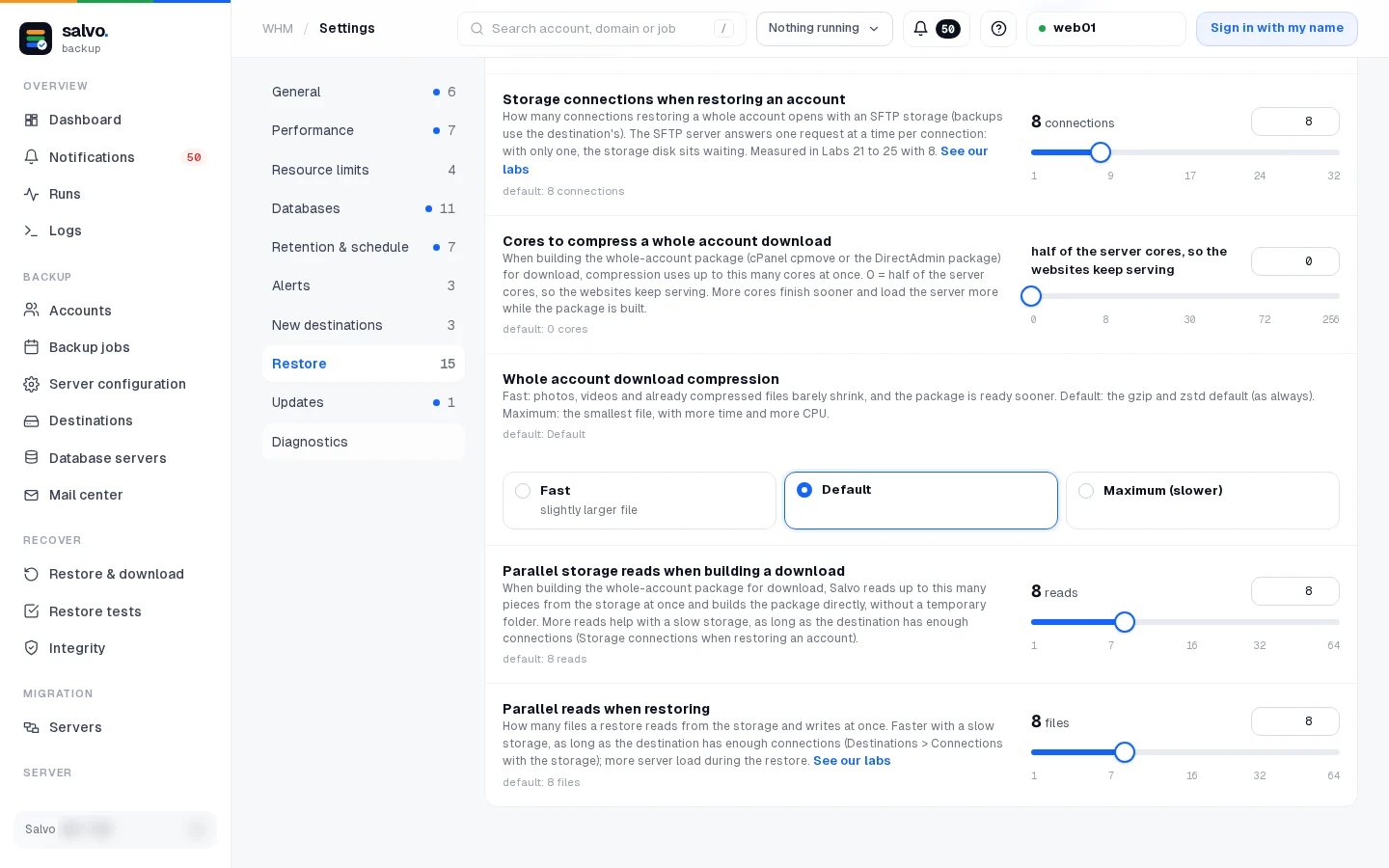
In the new process, the package is built straight from the backup, with no intermediate copy on the server disk; reading the storage and compressing go together, compression uses several cores (by default, half of the server's cores, so the sites keep serving) and the databases are prepared while the home is read. Salvo reads the storage with several reads at once and stores each repeated part only once: on the 13 GB account it read 3.4 GiB from the storage, against 8.9 GiB for JetBackup, and, in the first round, kept the storage disk busy for 2:40m, against 19:52m for JetBackup. The admin tunes cores, compression level and simultaneous storage reads in Settings › Restore.
- In the second round, another job started using the storage disk during the 13 GB account and the repeat of the 5 GB one: those times were measured in worse conditions, and the 13 GB account's disk busy time comes from the first round.
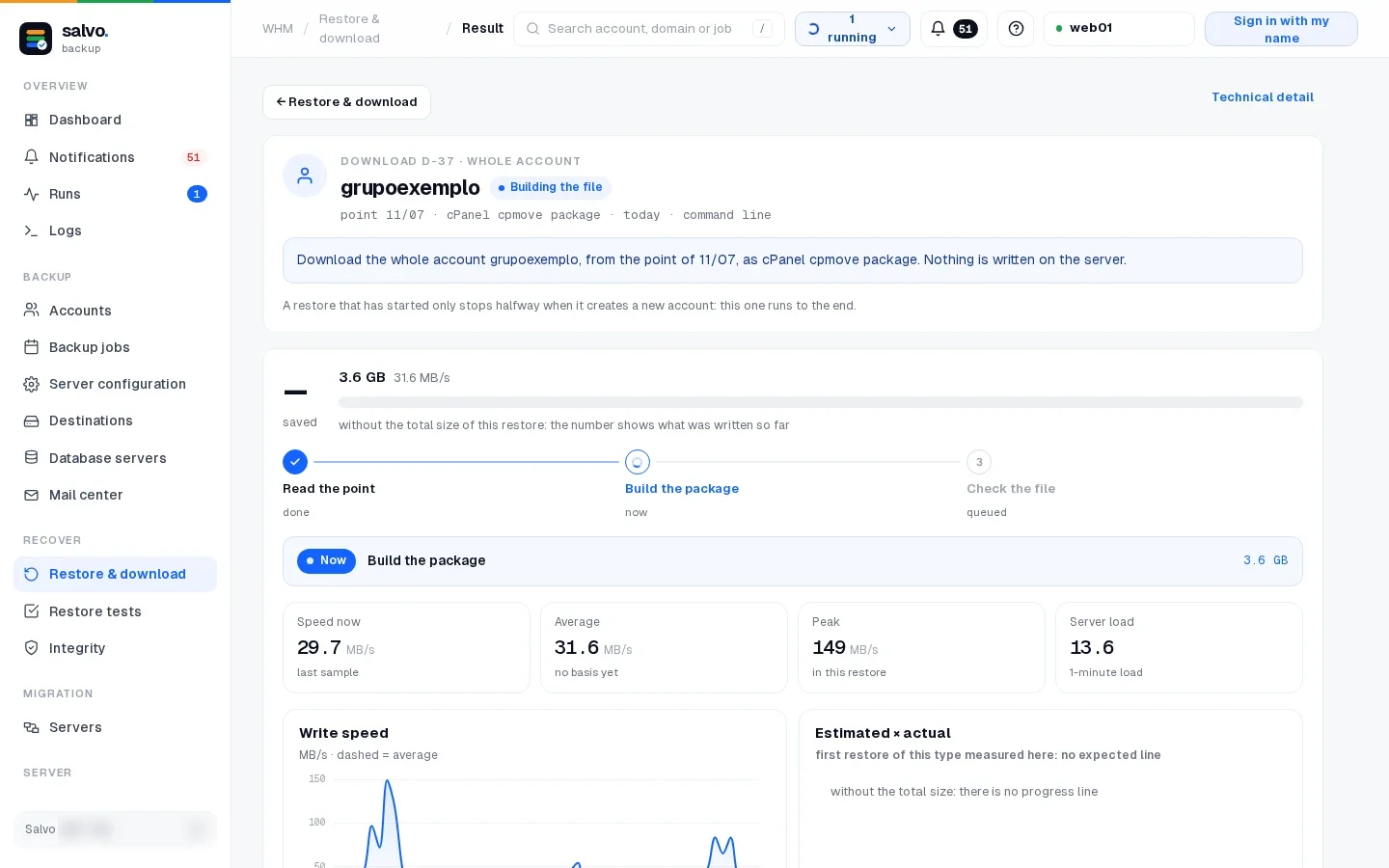
- Salvo weighs more on the server while it runs: on the 13 GB account, an average load of 13.7 against 5 for JetBackup, with compression using 2 to 2.6 of the 8 cores.
- The new process's file is about 7% bigger, because multi-core compression works in blocks.
- On the 5 GB account, fast compression (1:16m) benefited from the storage cache, which had just read the same account; the default is still the recommended one.
- The backups were not from the same day: JetBackup's was from Oct 1 and Salvo's from the night of the test; the accounts changed little in that interval.
- One server and three accounts: not a market average.
Reproduce it on your server
You don't have to take our word for it. With Salvo installed and a backup of the account, you can repeat this test on any cPanel server and compare it with the tool you use today.
- In a terminal on the server, keep load and disk being logged every 2 s:
vmstat 2 > load.txt & iostat -dx 2 > disk.txt & - Ask Salvo for the whole-account package from the latest good backup, and time it. On screen, it is Restore and download › Download › The whole account: the time runs from the request until the file shows as ready.
time salvo restore-download --kind account --job <job ID> --account <account> - In the other tool, request the whole-account download from its screen and note the time from the request to the file ready.
- Stop the logging and compare the time, the average load and the server disk. If you have access to the storage, measure its disk too.
kill %1 %2 - Restore Salvo's package on another server from cPanel's screen ("Transfer or Restore a cPanel Account") and check the account.
Repeat the test
The method, the numbers and the storage series are on this page. Anyone who wants to repeat it, including the JetBackup team, has everything they need. If the result is different, we want to know.
Download the storage series (CSV)