
Short answer: almost every admin knows how much free space the backup storage has, but not how much the backup itself takes, nor how much each job or each account adds per day. Salvo shows the space it uses on the destination, apart from the whole disk, how much each account takes in the backup and how much is its own, how much each job wrote and how much deduplication saved. On a lab server with 74 accounts, the largest has 62.2 GB on the server and takes 36.9 GB in the backup, 22.5 GB of it its own. To free up space, it shows how much each kept point costs and what leaves in the next cleanups, before anything is deleted. JetBackup 5 does not show how much the backup takes: for the destination, it reports the storage's whole disk; per account, the size on the server.
Backup storage full: a car without a fuel gauge
You have a car, but it doesn't tell you how much fuel or battery you have left. Does that sound acceptable?
With backups, that is what happens on many hosting servers: the storage fills up, the night's backup fails, and only then does someone find out where the space went. Your phone shows how much each app takes. Your bank statement shows the entries, not just the balance. At the airport, luggage is weighed bag by bag, not just the whole plane. The server's backup deserves the same care.
How much disk space does the backup use?
"How much space am I using in the repository? How much does each account use?" It sounds simple. In practice, the answer is usually the number for the storage's whole disk, which mixes this server's backup with other servers', with old copies and with everything else stored there.
Whose space is that? The number JetBackup 5 shows for the destination is the whole storage, not your backup. On the servers we surveyed, two servers writing to the same storage showed the same number. As an illustrative example, something like "38 TB used of 50 TB": you can see the storage is filling up, not who is filling it.
Backup disk usage: Salvo shows it. JetBackup doesn't
| The admin's question | Salvo | JetBackup 5 |
|---|---|---|
| How much does this server's backup take on the destination? | Yes: the backup's space, apart from the whole disk | No: it reports the storage's whole disk |
| How much does each account take in the backup? | Yes: account by account, with what is its own | No: "Total Accounts Usage" is their size on the server |
| How much does each kind of stored data take? | Yes: how much each job wrote (accounts, databases, configuration) | No: home, email and configuration come with no size |
| How much does the backup take on an S3 destination? | Yes: the usage in the bucket | No: it shows as N/A |
JetBackup 5: what its API reported on the servers we surveyed and what the 5.4 documentation said when read, on Nov 9, 2026.
What Salvo shows
- The space Salvo uses on the destination, apart from the disk: on the lab server, 2.8 GB. The number is the backup's, not the whole storage disk's.
- The growth forecast: "+0.1 GB/day", calculated from what was measured after each backup, with the chart next to it.
- How much each job wrote, already compressed and without repeated parts, and how many points each one keeps.
- How much deduplication saved, in total and per job.
- Who grows most: how much each account added in the last 7 days, already compressed and without repeats, on any kind of destination.
- What maintenance freed: "freed 86.7 MB · 5:02m".
With compression only, without deduplication, the same points would take about 14.5 GB. That is an estimate: the measured compression rate, applied to the total.
How much does backup deduplication save? Not everything deduplicates
| Job | Without deduplication | Written by Salvo | Saved |
|---|---|---|---|
| Server databases (11 points) | 42.1 GB | 1.4 GB | 97% |
| Second MySQL server databases (6 points) | 30.9 GB | 467.9 MB | 98% |
| Server configuration (7 points) | 36.3 MB | 36.3 MB | 0% |
The server configuration saved nothing: 36.3 MB written for 36.3 MB. We'd rather show the 0% than hide the row. Whoever runs the server needs to know where space is saved and where it isn't.
30 days of backups of a 2 GB database: how much space? In a file-based incremental backup, a database that changes goes in whole again. The JetBackup 5.4 documentation gives the example of a 2 GB account with 30-day retention, which "will only consume 2GB + 30 Days worth of new/changed data", and says that if the databases are modified, it generates a new full dump. A 2 GB database that changes every day can become up to 30 full dumps a month, before any compression. In Salvo, only what changed goes in again: the 11 points of the server databases would add up to 42.1 GB and take 1.4 GB.
In the example, the admin would avoid spending about 58 GB on a single 2 GB database, in 30 days.
Backup disk usage per account: how much each one takes
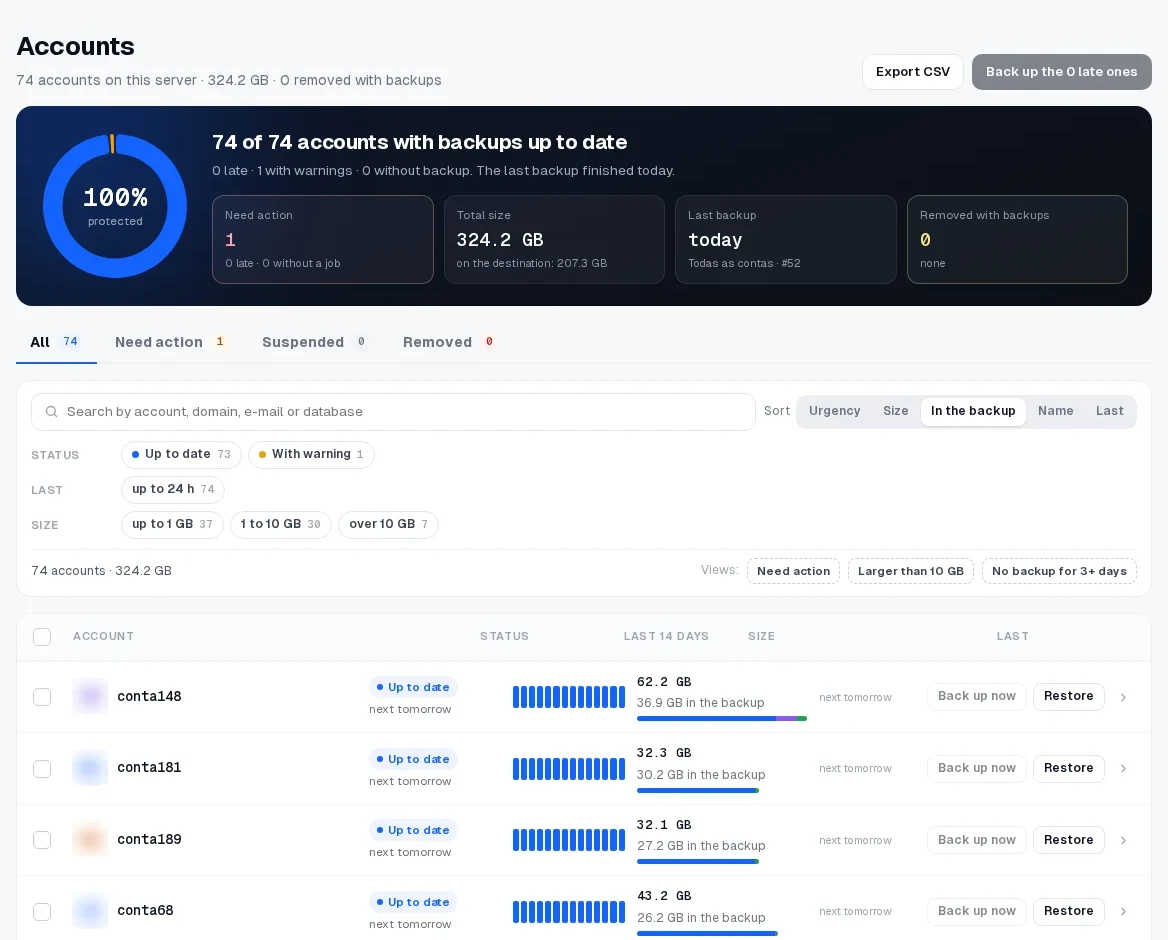
This is the question from the start, and now it has an answer on screen. In the account list, each one shows its size on the server and how much it takes in the backup. On another lab server, with 74 accounts and 324.2 GB, Salvo takes 207.3 GB on the destination, with every restore point kept.
| Account | On the server | In the backup | Its own |
|---|---|---|---|
| conta148 | 62.2 GB | 36.9 GB | 22.5 GB |
| conta181 | 32.3 GB | 30.2 GB | 29.0 GB |
| conta189 | 32.1 GB | 27.2 GB | 26.8 GB |
| conta68 | 43.2 GB | 26.2 GB | 13.7 GB |
"Its own" is the space that would come back if the account left the backup. The rest is shared with other accounts: on the largest one, 14.4 GB are the same data as another account in the same group, stored once. That is why the accounts add up to more than the destination total: shared space shows up in each account that uses it, and the right number for the whole backup is the destination's, 207.3 GB.
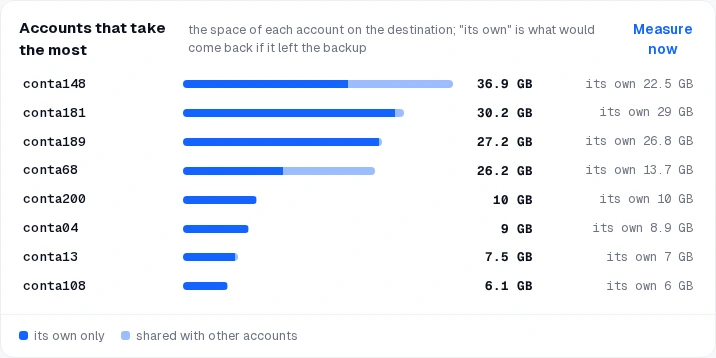
The measurement walks the destination itself: for the 74 accounts and the databases, it took 4 minutes, only reading the storage. It runs on its own after the daily maintenance and also from the "Measure now" button.
The backup storage is full: how do I free up space?
Knowing who takes the space is half the answer. The other half is freeing it without deleting the wrong backup. In Salvo, that is done through each job's retention rule, not by deleting files by hand on the storage. Retention and maintenance work the same way on cPanel/WHM and DirectAdmin servers.
- See who takes it. "Accounts that take the most" shows what is each account's own: the space that would come back if it left the backup.
- See what each kept point costs. In the job's schedule and retention, Salvo says how much each extra point keeps on the destination and, when you change the number, how much the change adds or removes. It is the average of what is new in each run of that job.
- See what will leave, before it leaves. The destination shows the points kept per job and what leaves in the next cleanups, day by day. In Maintenance, "Simulate" shows what retention would delete, without deleting anything.
- Free it. Retention removes the points past the limit at the end of each run of the job. Then maintenance frees the space on the storage, measures before and after and says how much it freed.
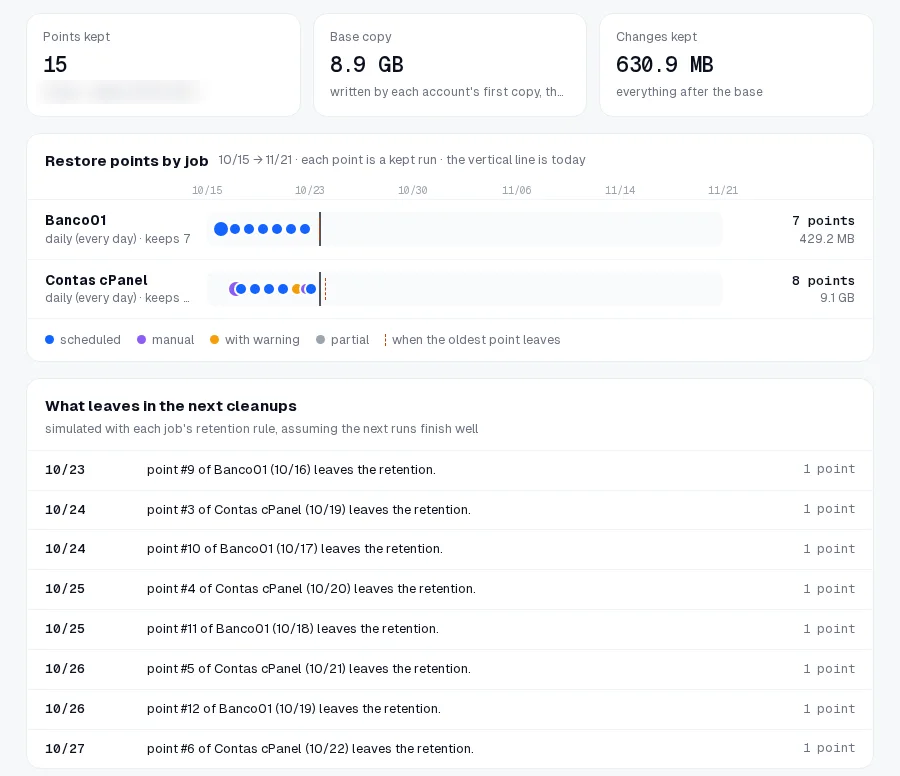
Changing how many points are kept deletes nothing right away: the oldest point only leaves when it goes past the new limit, and the last good point of each account is never deleted. Backups left behind by a deleted job show up in their own card on the destination, with the button to delete them. That work runs in the background, and the admin keeps using the screen.
- JetBackup 5 reports the storage's whole disk and the size of the accounts on the server: it does not show how much the backup takes, in total or per account.
- Salvo shows the space it uses on the destination, the growth forecast, how much each job wrote and who grows most in the week.
- On a lab server, 24 points that would take 73.1 GB take 2.8 GB: 96% less.
- Each account shows how much it takes in the backup and how much is its own: the space that would come back if it left.
- To free up space, Salvo shows how much each kept point costs and what leaves in the next cleanups, before anything is deleted.
- Not everything deduplicates: the server configuration saved 0%, and the screen shows it.
Frequently asked questions
Does JetBackup show how much each account takes in the backup?
No. On the servers we surveyed, JetBackup 5 reported the storage's whole disk for the destination, and home, email and configuration items came with no size through its API. The panel's "Total Accounts Usage" is, according to the 5.4 documentation read on Nov 9, 2026, the size of the accounts on the server. Salvo shows the backup's space on the destination, how much each job wrote and how much each account takes.
The backup storage is full on my cPanel server: where do I start?
With Salvo, start with who takes the space: the destination shows how much the backup takes, how much each job wrote and the accounts that take the most, with what is each one's own. Then see how much each kept point costs in the job's retention, simulate what would leave and let retention and maintenance free the space.
How do I delete old backups in cPanel or WHM to free up space?
With Salvo, you don't need to delete backups by hand: you set how many points each job keeps, and retention removes the ones past the limit at the end of each run. Then maintenance frees the space on the storage and says how much it freed. Before anything leaves, "Simulate" shows what would be deleted, without deleting anything.
How does backup retention work in DirectAdmin with Salvo?
The same as in cPanel: retention belongs to each job. Each schedule keeps a number of points or the points of the last days, and manual backups can have their own limit. Changing the number deletes nothing right away: the oldest point only leaves when it goes past the new limit.
Does Salvo show how much the backup takes on an S3 destination?
Yes. On an S3-compatible destination, Salvo shows how much it uses in the bucket, the old versions the provider keeps charging for until a lifecycle rule deletes them, and how usage grows after each backup. The date the destination fills up only appears where there is a disk with a size, such as SFTP and local: a bucket has no total or free space.
Does deduplication make the backup more fragile?
Each restore point stays complete: what changes is that a repeated part is written once and used by every point that needs it. The restores in our labs were done from these points.
Where does the growth forecast come from?
From what was measured after each backup on this server. Without enough measurements, Salvo says it has no basis yet, instead of making up a number.