Lab 19 · Compatibility

The account is gone: back, whole, from the backup, in about 2 minutes

Date: Oct 17, 2026Server: one real account, ~23 thousand messagesReading time: 3 minTopic: Compatibility
The question

Someone deleted the wrong account. The customer calls with no site and no email, and every minute counts. An email and website account is deleted from the server. With the Salvo backup on the storage, how long does it take to come back, and does it come back the same? Does it matter whether it is restored from the panel or the command line?

Result
~2 minfrom deleted account to the whole account back: 2 min 09 s from the command line and 1 min 51 s from the panel
23,174email messages back, out of 23,174, in both restores, with no warnings

Why it matters to whoever runs the server

  • About 2 minutes from deleted account to account back (2 min 09 s from the command line, 1 min 51 s from the panel): the account is back with the customer still on the phone.
  • 23,174 messages out of 23,174: not one message lost.
  • The screen shows which backup the account came from, what came back and what the server felt: the admin answers the customer with data, not with “it should all be there”.
From deleted account to account backTime of each step, from the same backup on the storage
Source: Salvo Lab · one real account, restored on the same server · Oct 17, 2026
Command linePanel
Fetch from storage and assemble the account1 min 14 s1 min 04 s
Restore on the server49 s42 s
Total, from deleted account to account back2 min 09 s1 min 51 s
Email messages23,174 of 23,17423,174 of 23,174
Mailboxes and domains14 and 214 and 2
Warningsnonenone

On the Salvo screen

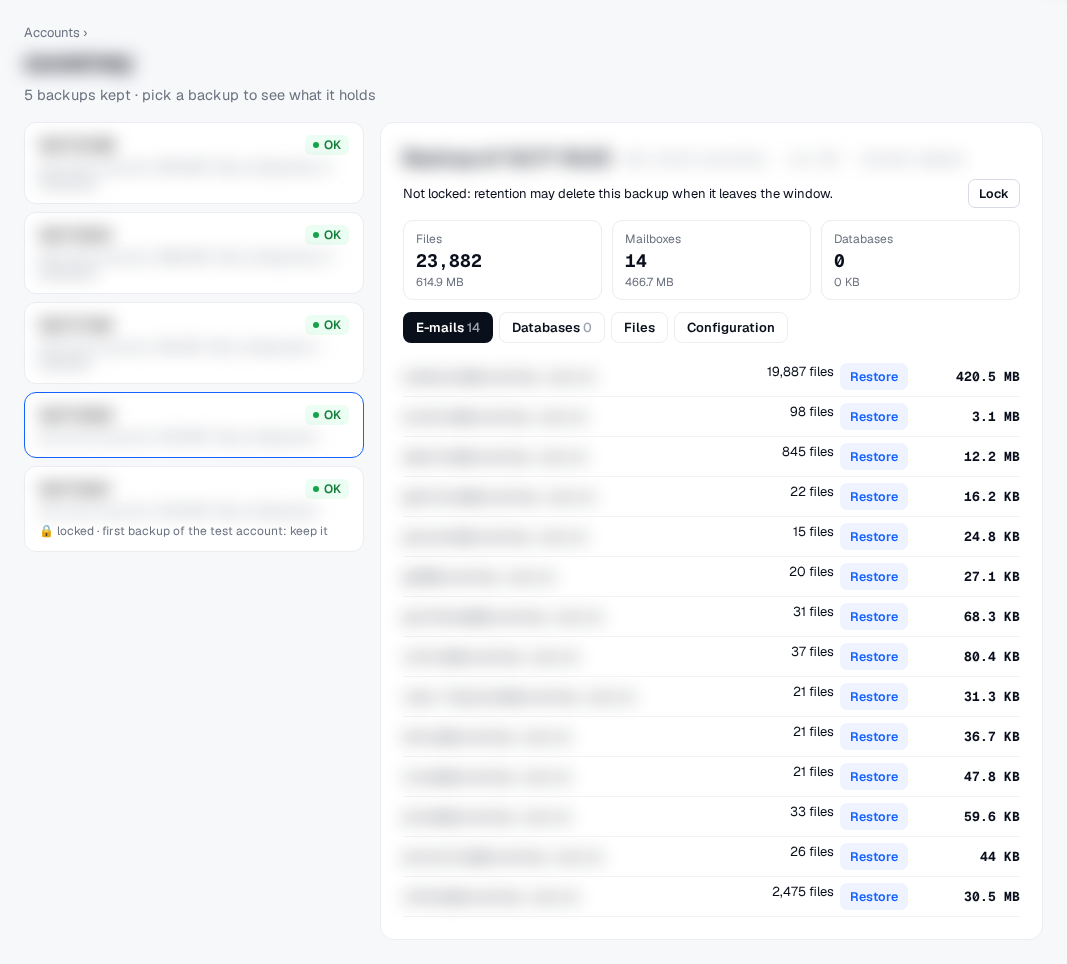
The account’s stored backups and what each one holds: 14 mailboxes, each with a button to restore just that one.
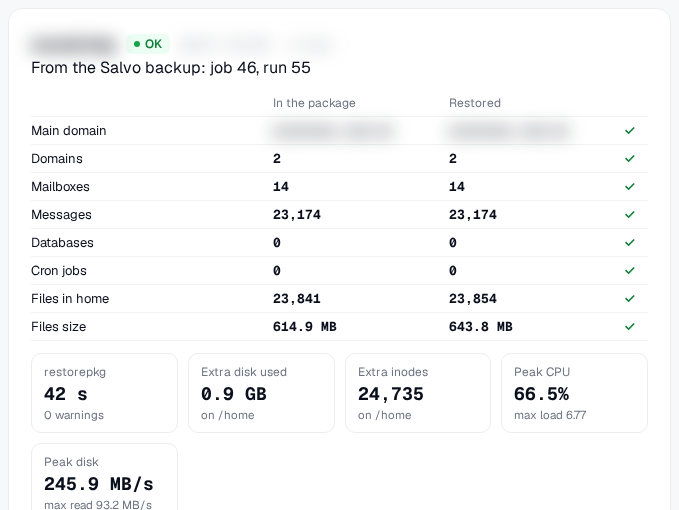
The result of the restore from the panel: what was in the backup and what came back, item by item, and what the server felt.
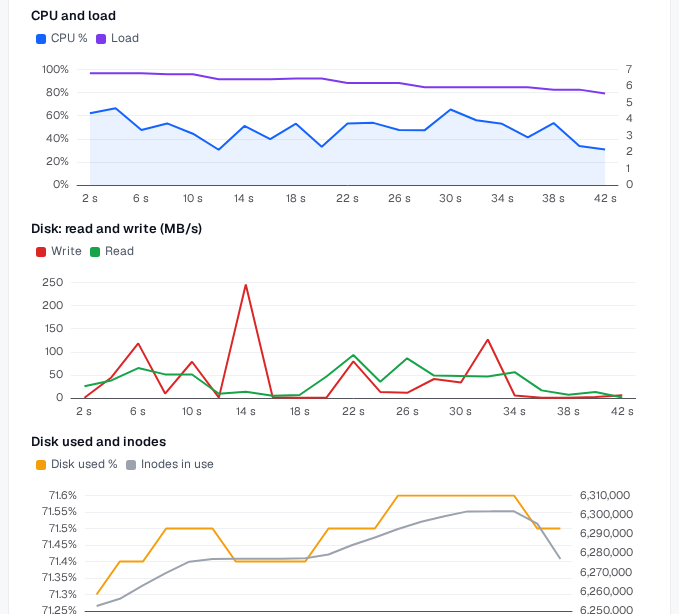
The server during the restore, every 2 seconds: CPU and load, disk reads and writes, disk usage and inodes.

Method

One real email and website account: about 26 thousand files, 2 domains and 14 mailboxes with 23 thousand messages, no database.

The backup job was created from the Salvo panel and ran twice: first with the “Run now” button (15 s) and then, incrementally, from the command line (6 s). The backup goes to a network storage, compressed.

Before the “disaster”, we took a snapshot of the account: size and hash of every file.

The account was deleted from the server and restored from the backup, first from the command line; then it was deleted again and restored from the panel.

Result, separating customer files (website, uploaded files and messages) from those the system recreates on its own (mail server indexes, panel caches, logs and temporary files): 23,238 of 23,272 customer files identical to the snapshot (99.85%). The 34 that differ: 19 emails that reached the account after the backup, so they were not in it, and 15 files the panel rewrites on restore (the PHP version in .htaccess, php.ini and .user.ini, and the converted webmail database). No message that was in the backup was missing. From the panel and the command line, the result was the same, with the same record of what happened.

What we decided

On the restore screen, the admin sees which backup the account came from, what was in the backup and what came back, item by item, how long each step took and what the server felt (CPU, load, disk and inodes), in charts. The history keeps every restore, to compare over time.

?
What we don’t know yetOne account, no database; accounts with databases and partial restores (one database, one mailbox) are the next tests. The account was restored on the same server it came from, the “I deleted it by mistake” case; restoring on another server from the storage is the next lab.
Want to see Salvo on your server?Join the beta waitlist. We’ll let you know when there’s a spot.

How it connects to the other labs

Integrity checked file by file
20 sThe whole account restored on another server: domains, email, identical database and grantsLab 11 · Oct 15, 202699.96%Disaster recovery: 10 whole accounts on another server, 99.96% of customer files identicalLab 16 · Oct 16, 2026100%Restoring a cPanel backup through Salvo: four times, the same result, and 100% of messages identicalLab 18 · Oct 17, 20265 of 5Restore only what you need: a database, a mailbox, a few files, all back exactly as they wereLab 20 · Oct 17, 20265.2×We improved Salvo’s restore: a 10 GB account back in 5 min 45 s, at the storage’s worst hourLab 21 · Oct 19, 20263.3 sWordPress: restore only the table that broke, in 3 seconds instead of 2 minutesLab 22 · Oct 18, 202699.98%WordPress backup with email: 6 real sites restored by Salvo and by JetBackupLab 23 · Oct 19, 2026250 sRestoring WordPress with Salvo faster than with the cPanel package: 6 real sites, one and many accounts at a timeLab 24 · Oct 19, 2026
salvo. Backup for hosting servers. A GK2 product.
Product
Lab
Salvo
Language
© 2026 GK2We use analytics cookies (Google Analytics).salvobackup.com/lab/the-account-is-gone-back-whole-from-the-backup/